
Effortless Timestamp Conversion Tool
Overview
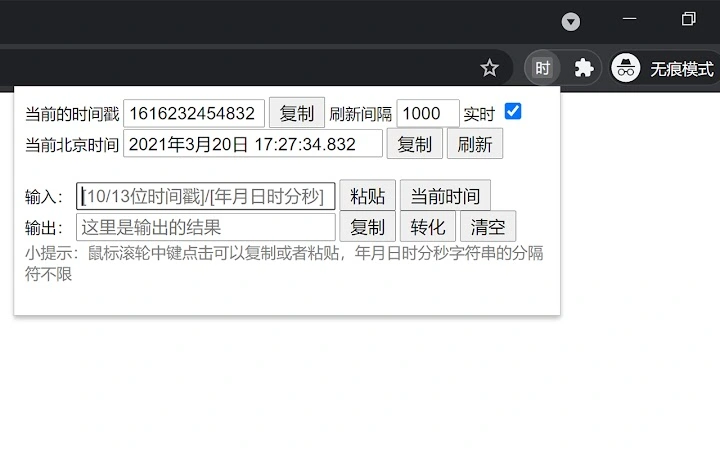
The Time Stamp Converter is a lightweight desktop utility designed to simplify the process of converting between timestamps and human-readable dates. It targets users who frequently work with time-based data, such as developers, testers, and data analysts. The tool automatically detects 10-digit or 13-digit timestamps and converts them to standard date formats without requiring users to specify separators or input formats. It also supports direct conversion of selected text strings from any application, streamlining workflows that involve parsing or validating time data.
Designed for both Windows and Mac, the software operates as a standalone desktop application with minimal system impact. Its primary purpose is to eliminate the need for manual calculations or external tools when handling time data. Real-world usage includes debugging timestamp-related issues, verifying API responses, and preparing reports that require consistent date formatting. The developer did not provide additional background information.
Key Features & Capabilities
- Automatic Timestamp Detection – Recognizes 10-digit and 13-digit timestamps without user input, enabling instant conversion to readable date formats.
- Text Selection Integration – Version 1.0.2 introduced the ability to convert selected text via a right-click context menu, enhancing efficiency when working within documents, code editors, or web pages.
- Flexible Input Handling – Accepts timestamps or date strings with any separator (e.g., hyphens, slashes, spaces) or no separator at all, ensuring compatibility with various data sources.
- One-Click Conversion – Users can paste or select time data and receive immediate output, reducing friction in time-sensitive workflows.
For example, a developer debugging an API might copy a 13-digit timestamp from a log file and use the right-click menu to instantly view the corresponding date. Similarly, a tester verifying response times could convert a series of timestamps into readable dates for documentation. The tool supports seamless integration into daily tasks without requiring configuration or setup.
User Interface, Workflow & Performance
The application features a minimalistic interface focused on core functionality. Users interact primarily through a simple input field and output display, with no complex menus or settings. Navigation is straightforward, relying on direct input or context menu integration. The workflow is designed for speed: paste a timestamp or select text, trigger conversion, and view results instantly.
Performance observations are based on general software behavior patterns. The tool is expected to operate efficiently due to its lightweight design and lack of background processes. The developer did not specify resource usage details. Stability appears consistent with its current version, though some users may encounter occasional issues with the right-click menu not appearing in certain applications. The application does not consume significant CPU or RAM during typical use.
Compatibility & System Requirements
The software is compatible with Windows and Mac operating systems. Version 1.0.2 was released on April 1, 2025, and has a file size of 1.5 MB, indicating a compact and efficient installation. The developer did not specify exact system requirements, including minimum RAM, processor speed, or storage space. Compatibility information was partially provided.
Users should expect smooth operation on modern desktop systems, but no guarantees are made regarding older hardware or legacy OS versions. The tool is intended for desktop use and does not require an internet connection to function. No cloud-based features or online dependencies are present.
Pros and Cons
Pros
- Simple, fast conversion of timestamps and date strings
- Automatic detection of 10/13-digit timestamps without user input
- Right-click menu integration for selected text (v1.0.2)
- Small file size (1.5 MB) with minimal system impact
- Free to use with no hidden costs
Cons
- Right-click menu does not support copy functionality
- Some applications may not trigger the right-click conversion menu
- No visible update notifications or auto-update mechanism
- Limited documentation or user guidance
- Future improvements are uncertain or not planned
FAQ Section
Is the Time Stamp Converter available for Windows and Mac?
Yes, the software is compatible with both Windows and Mac operating systems.
Can I use this tool offline?
Yes, the application does not require an internet connection to perform conversions.
Is the software free to download and use?
Yes, the tool is available at no cost with no trial period or subscription required.
How do I update to the latest version?
Users must manually check for updates, as no automatic update feature is currently implemented.
What type of license does this software use?
The license type was not specified in the provided information.
Final Thoughts
The Time Stamp Converter delivers a focused, efficient solution for users who need to convert timestamps quickly and accurately. Its automatic detection, minimal interface, and right-click integration make it a valuable tool for professionals working with time-based data. While it has limitations—such as the lack of copy functionality in the context menu and inconsistent menu behavior across applications—the core functionality remains reliable and fast.
For developers, testers, and anyone handling timestamps regularly, this lightweight utility offers a practical alternative to online converters or complex scripts. Its free status and small footprint further enhance its appeal. Despite minor usability hiccups, the tool excels in its niche. Download Time Stamp Converter now.







